From a Loom walkthrough to user stories: an open Agent Skill that turns screen recordings into specs
Recording feedback as a Loom is easy; turning it into work is not. video-to-spec is the open Agent Skill I built to close the gap – user stories with the screenshots attached.
Most of my product feedback – and by now a lot of our projects' feedback – starts as a Loom. I open the thing I want to improve, hit record, and think out loud while browsing it: ideas, small annoyances, half-formed feature requests, the occasional "wait, no, forget that", "this is weird". It is the most honest snapshot of what I want, and nobody can build from it.
So someone watches it and writes the tasks. What comes out is their reconstruction of my vision, and the part carrying most of the meaning – what was on screen when I said it – does not survive the trip into a ticket.
Writing the requirement down properly is itself the problem. You censor the brainstorm out of it, because a strict spec is a courtesy – you respect whoever has to work with that file after you. (Not that we do not respect AI – I would rather stay on its good side, and we do say thank you.)
That respect is what restricts you. No jumping between ideas, no going back on what you said two minutes ago, no half-formed thoughts on the page. A recording has none of those rules, and cleaning it up afterwards is mechanical work – the part AI is actually good at.
What I built
video-to-spec turns a screen recording into specs: a folder of user stories, each carrying the exact screenshots I was looking at when I spoke. It reads anything ffmpeg reads: a downloaded Loom, a QuickTime capture, .mp4, .mov, .webm. No new service, no account, no Loom integration: you point it at a file on your disk and it writes markdown next to your code. MIT-licensed, and the first skill in our public-skills repo on GitHub.
How it works
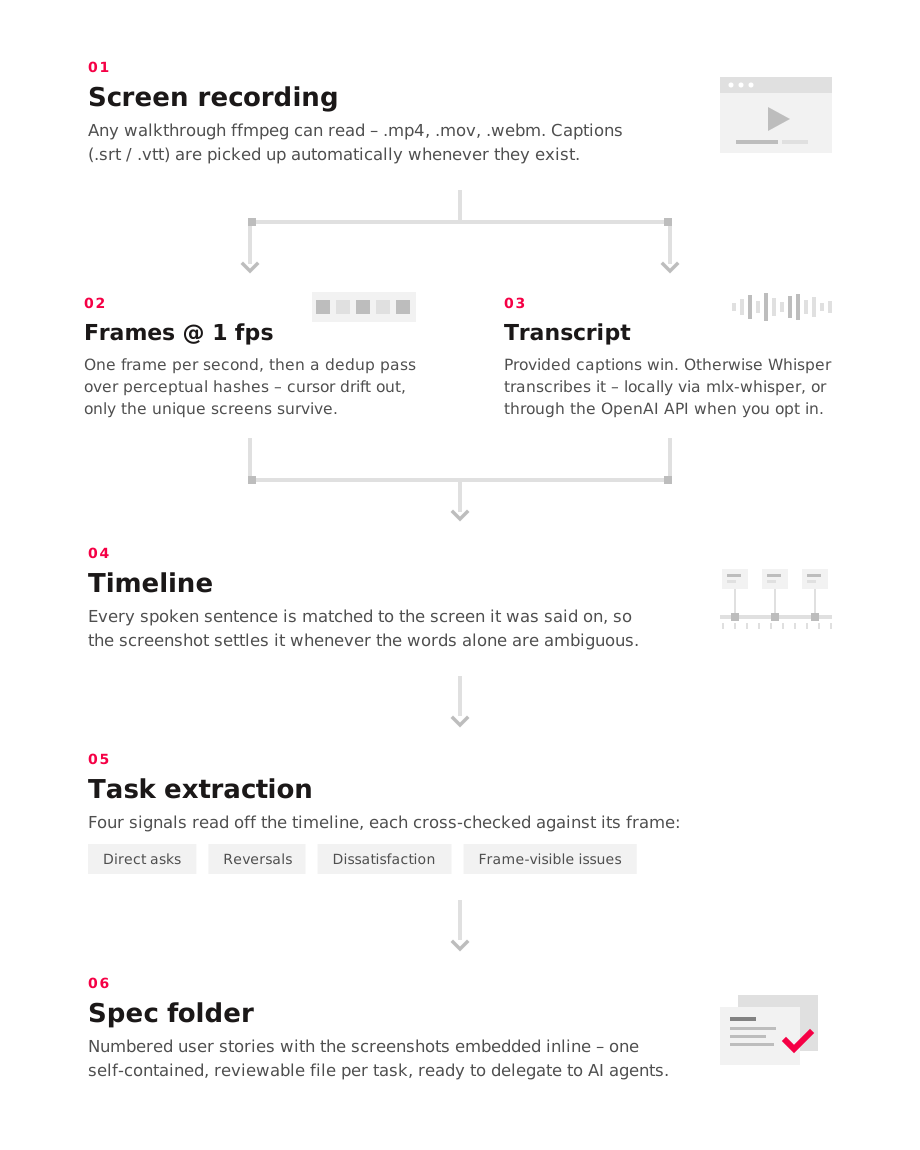
ffmpeg pulls one frame per second out of the video. A perceptual hash throws away the near-identical ones – ImageMagick if you have it, Python's imagehash as the fallback – so a cursor drifting across a static page collapses into one frame, while modals, scrolls, navigation and form input survive as separate screens.
For the words, the cheapest path is the one where you already have them: if the recording comes with an .srt or .vtt beside it, the skill skips transcription. Loom transcribes on every plan, though downloading the caption file is a Business or Enterprise feature.
Otherwise it transcribes. If mlx-whisper or openai-whisper is installed on your machine, the skill prefers those – free, and your audio never leaves the laptop. If neither is there, it can call OpenAI's API at their published Whisper price of $0.006 per minute as of August 2026; there it is told to estimate the cost, say plainly that your audio is being uploaded, and wait for a yes. It never installs anything on your behalf.
Every spoken segment is then matched to the screen that was visible when it was said. The skill reads that timeline looking for four kinds of signal:
- Direct tasks – "we need to make sure...", "let's fix...", "this should...".
- Reversals – "wait, actually", "no, scratch that". The later statement wins, and the earlier intent is rewritten or dropped.
- Dissatisfaction – "this is weird", "doesn't make sense", "would be better if". These become a task only when the change can be named; otherwise it is logged as an open question.
- Indirect requirements – something visibly wrong in the frame that I am describing but never actually asking anyone to fix.
The frame, not the words alone, is the source of truth for what I was looking at. That is the reason to extract tasks from a video rather than its transcript.
What comes out
A folder in your repo, named after the recording and the day it was made: an index with the task list and open questions, one numbered file per task, and the frames they reference.
Each task file carries a short imperative title, a type, the source timestamps, a user story, the motivation, the context with screenshots inline, and what to do. What and why, not how.
Everything is drafted first, then the skill asks its questions in one batch: ambiguities, contradictions, places it over-reached. You answer once and the affected specs are updated. I supervise at a named gate, I do not author.
The folder is delegable. To sub-agents, to an AI coding agent, or to a human team – it is markdown with screenshots, and a person reads it as easily as a model.
A real run
The last one I ran was 4 minutes 16 seconds long: a walkthrough of a playground project of mine, a small macOS menu-bar app that records my meetings. It came back with nine task specs. All nine are implemented, and one of them by not building it: the spec had captured a non-goal.
Part of that recording is me demoing Wispr Flow (referral link), a voice-to-text tool I really like, and pointing at its dropdown because I wanted the same submenu in mine. The spec came back carrying my own words – "Past notes. I also would like to introduce a new past notes. We already have the account and we can pull it from the hub." – and the exact frame I was pointing at.
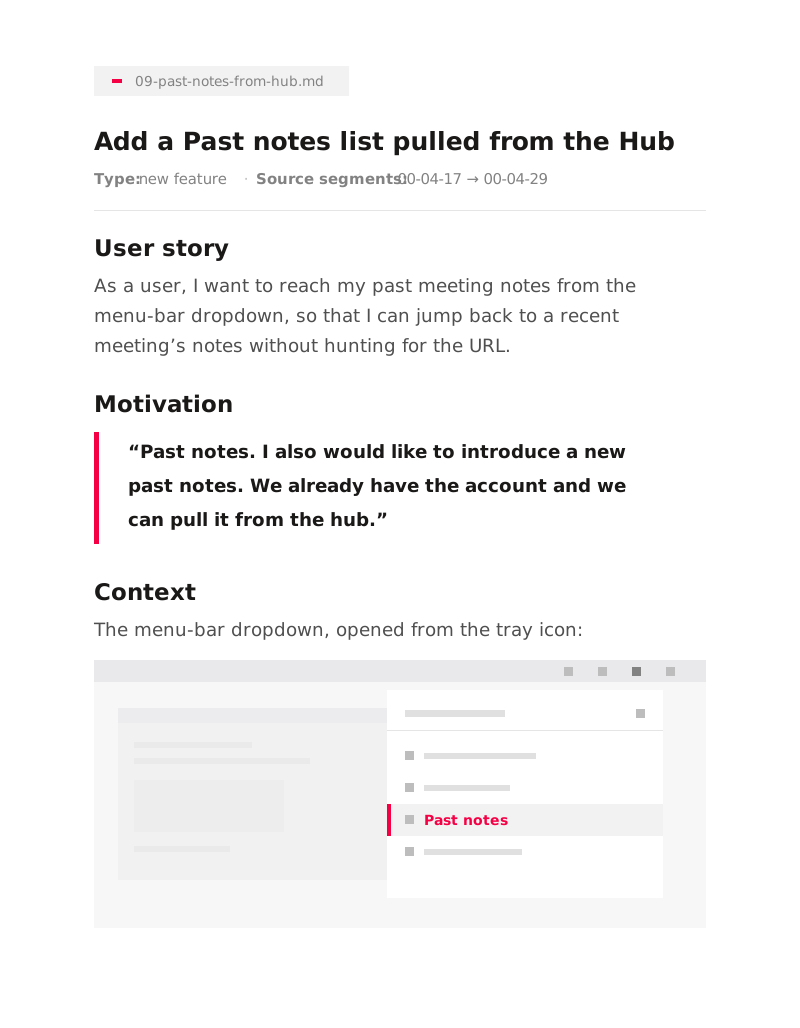
The transcript actually heard "fast notes". It came back in the batch of clarifying questions, I confirmed "Past notes", and the spec was fixed before any code was written.
One SKILL.md, any agent
video-to-spec is an Agent Skill – a folder with a SKILL.md in it, following the standard documented at agentskills.io. The format was originally developed by Anthropic, released as an open standard, and is now read by a growing number of agent products.
So it works with Claude Code, Codex, Cursor, OpenCode, Gemini CLI and dozens of other skills-compatible agents – not because anyone shipped an integration, but because they all read the same file. Progressive disclosure keeps it cheap: your agent loads only the name and description at startup, about a hundred tokens, and reads the rest when a task matches.
One caveat, since I would want to know. I have run it in Claude Code; elsewhere it should behave the same – it is spec-conformant and calls nothing product-specific – but I have not tested each harness.
Install
git clone https://github.com/everlabs/public-skills.git
cp -R public-skills/video-to-spec ~/.claude/skills/
That is the Claude Code path; for Codex, Cursor, OpenCode and Gemini CLI, copy it into ~/.agents/skills/ instead – the interoperable path they all read. It needs ffmpeg and an image hasher, and no pip packages on the default path. Then name your file and say "turn this walkthrough into tasks".
The point was never the transcription. The point is that the spec is the artifact – not the ticket, not somebody's notes from the call – and a spec with the screenshot attached is delegable, so the code gets written against the actual screen, not someone's memory of a walkthrough. Ambiguity is cheapest to kill early, and mine starts in a recording.
It is open source at github.com/everlabs/public-skills. Try it on your next walkthrough and tell me where it gets you wrong.